

What is the Inbox?
The Inbox is your central hub for viewing and managing all customer conversations across chat, voice, text/SMS, and email channels. Every interaction is organized, searchable, and easily accessible.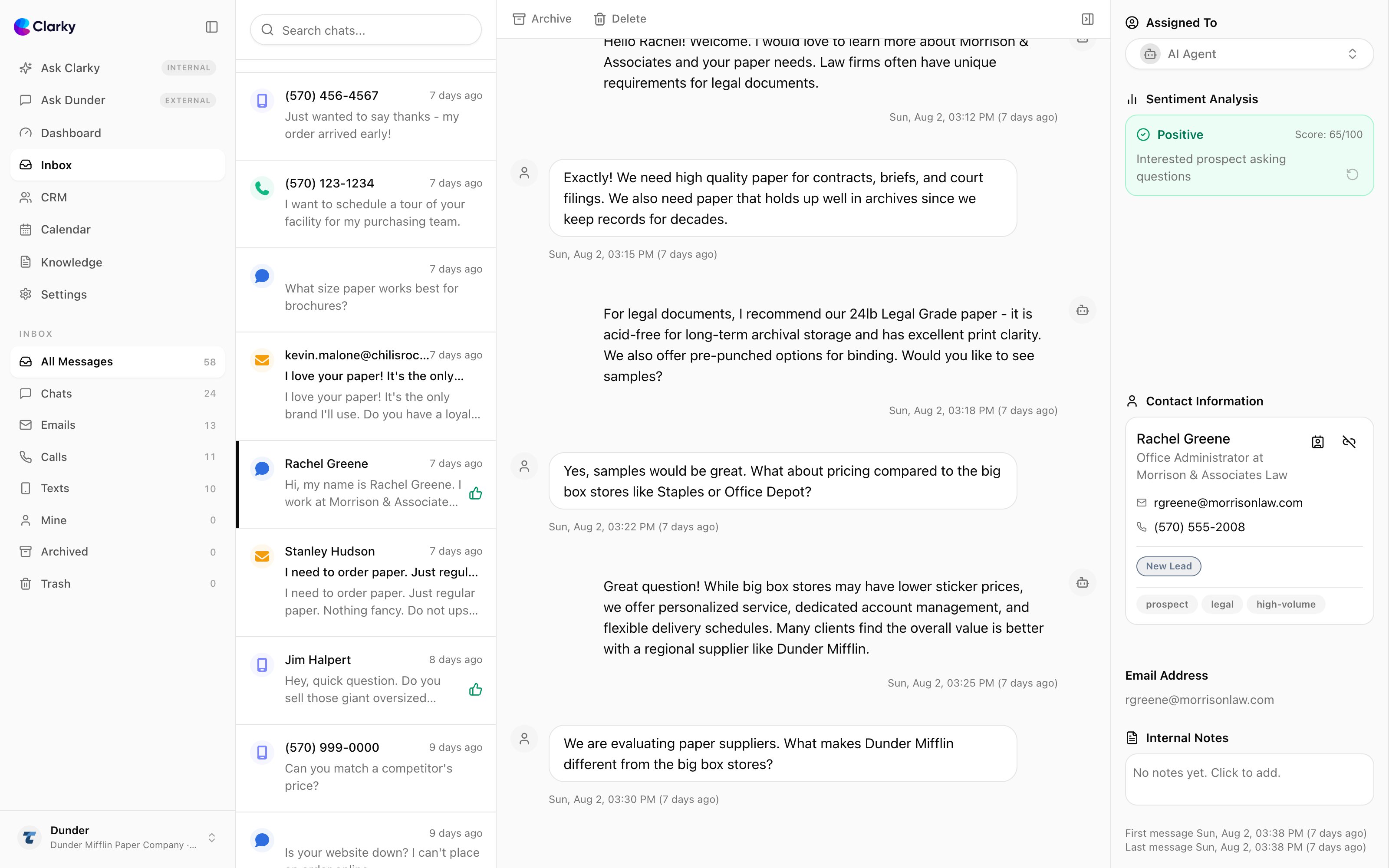
Key Features
Unified View
All channels in one place
Real-Time Updates
See conversations as they happen
Human Takeover
Jump into conversations when needed
Search & Filter
Find any conversation quickly
Inbox Layout
Conversation List
The left panel shows all conversations:- Most Recent First: Newest conversations appear at the top
- Channel Icons: Identify the communication channel
- Preview Text: See the latest message
- Unread Counts: Number of unread messages
Conversation View
The main panel displays the selected conversation:- Full Message History: Complete conversation thread
- Customer Info: Contact details and history
- Quick Actions: Take over, link to CRM, add notes
- Channel Context: Specific details for the channel
Sidebar
The right panel shows contextual information:- Sentiment Analysis: Conversation sentiment over time
- Contact Profile: Customer name, email, phone
- Conversation Details: Duration, status, channel
- CRM Link: Associated contact record
- Tags and Notes: Custom labels and annotations
Accessing the Inbox
1
Navigate to Inbox
Click “Inbox” in the main navigation.
2
Browse Conversations
Scroll through the list or use search and filters.
3
Open a Conversation
Click any conversation to view the full details.
Real-Time Features
Live Conversation Indicators
See when users are actively chatting:- Active: User is currently in the conversation
- Typing Indicator: Agent or user is typing
- Last Seen: Time of last message
Notifications
Get notified when:- New conversation starts
- User sends a message in an active conversation
- Conversation needs human attention
- User has been waiting too long
Next Steps
View Conversations
Learn about managing conversations
Human Takeover
Take control when needed
Filter & Search
Find conversations quickly
Link to CRM
Connect conversations to contacts